
Course discovery
Choose a course, module, or individual lesson
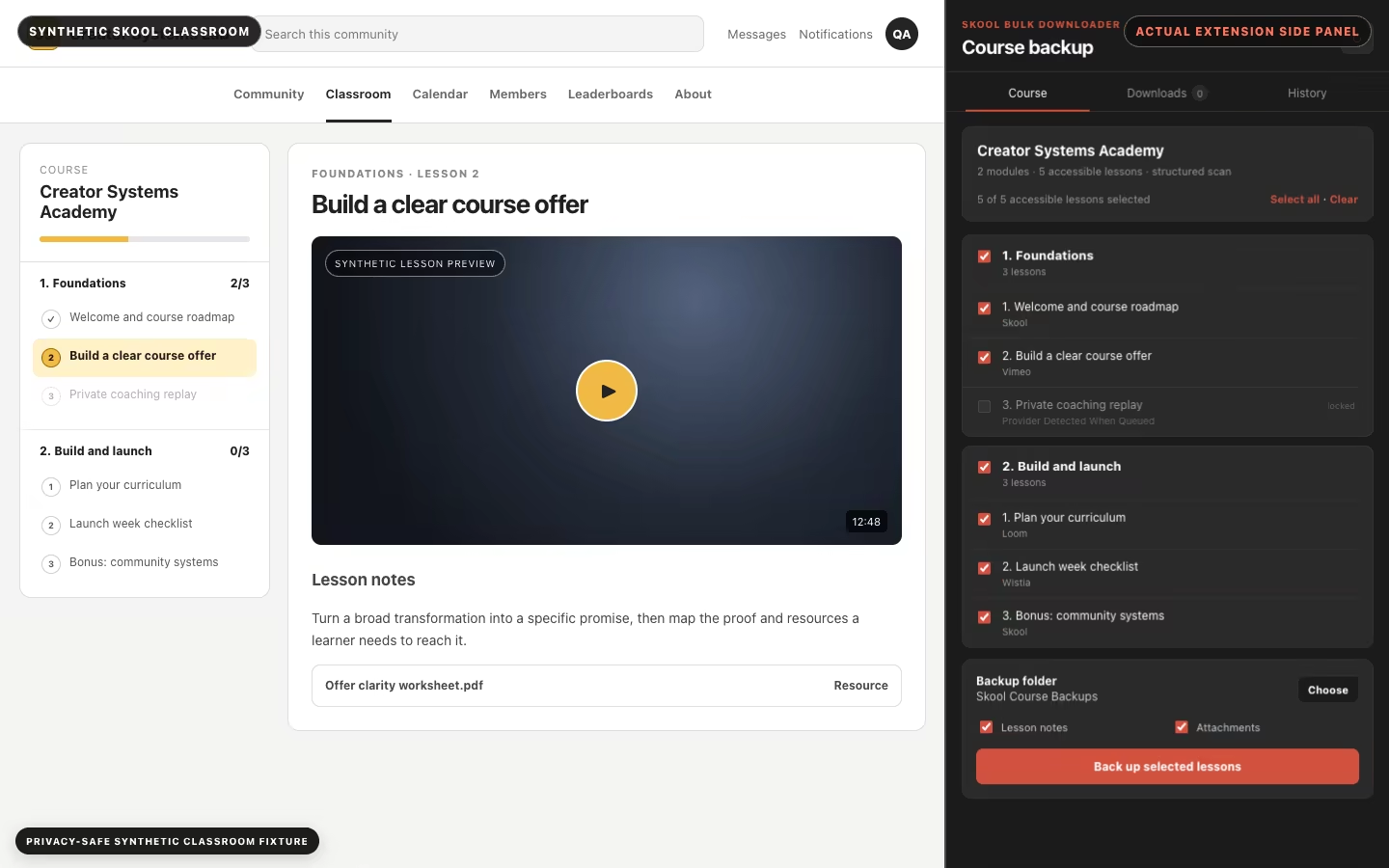
See the classroom structure in order, select the accessible material you need, and leave locked lessons untouched.
Skool Bulk Downloader turns an authorized classroom into an organized local backup with supported videos, lesson notes, resources, and a clear completion report.
The classroom stays visible while the real side panel discovers modules, lessons, locked items, and backup controls.
The actual extension
This 18-second walkthrough was made from the current testing build with a synthetic course. It shows the real popup launcher, side panel, and download states beside a privacy-safe classroom fixture—no private classroom or customer account.
Plain files, useful later
The course, modules, and lessons keep their order. Supported video, notes, resources, and the final report are ordinary local files in the folder you choose.
The offline gap
Skool is excellent for streaming inside a community. It is less convenient when you want to revise on a flight, commute with unreliable service, or keep permitted copies of your own training material.
Skool Bulk Downloader turns selected, accessible course lessons into an ordered local archive—with supported videos, notes, resources, and a report of anything skipped.
Purpose-built controls for backing up selected course material without terminal commands.
Course discovery
See the classroom structure in order, select the accessible material you need, and leave locked lessons untouched.
Local by design
Compatible media is processed locally instead of being uploaded to a third-party conversion site.
Structured output
Build predictable Course / Module / Lesson folders with supported MP4s and useful lesson context.
Clear progress
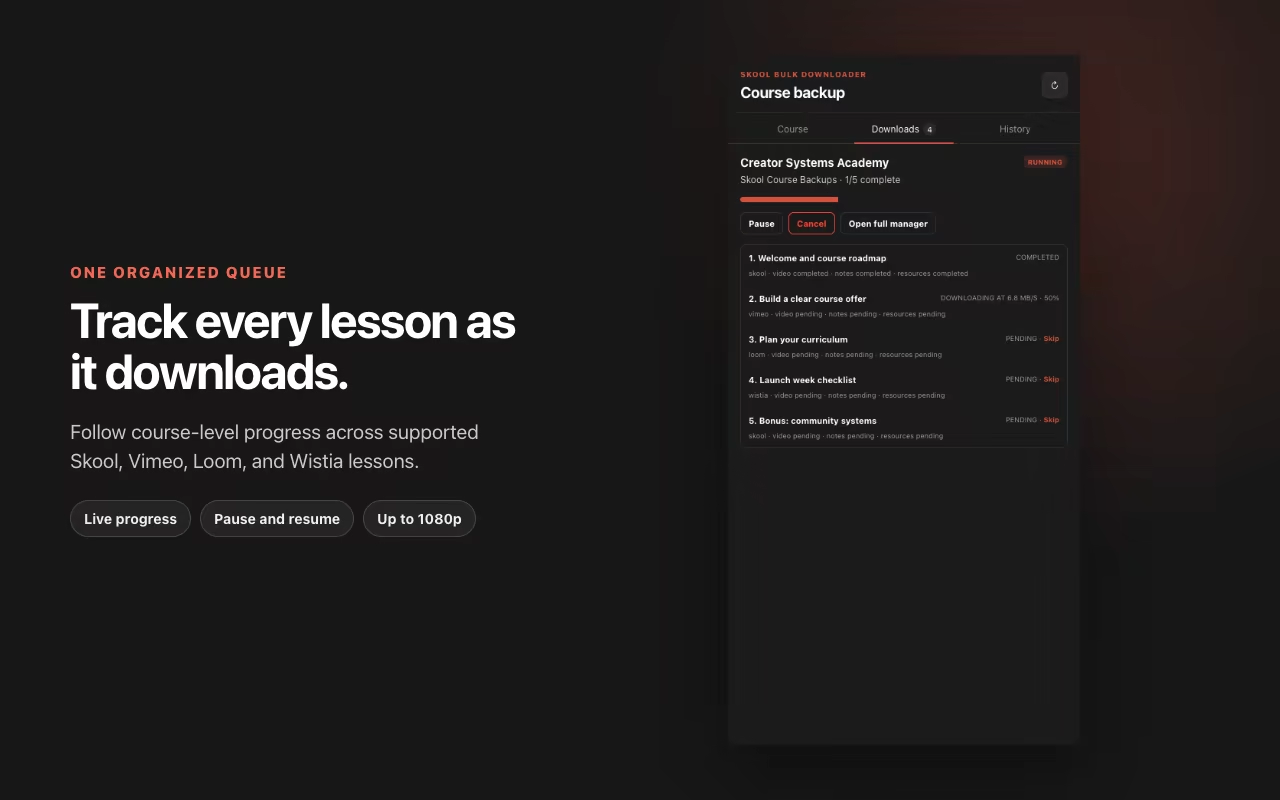
Follow the current lesson, retry a failure, and return to a persistent backup job without losing your place.
Honest outcomes
Back up supported Skool-native, Loom, Vimeo, and Wistia video. YouTube items stay documented in the report instead of being falsely marked complete.
No mystery workflow
Open the bulk downloader from an accessible Skool classroom. It discovers the course structure, preserves module and lesson order, and keeps the current backup job visible as it works through your selection.
Four simple steps
No pasted links, separate conversion websites, or guessing which player a course creator used.
Add the extension to Google Chrome 116 or newer, then activate your trial with your email.
Use your normal Skool account, open the bulk downloader, and let it discover the courses and lessons you can access.
Choose the full course, specific modules, or individual lessons, then set a quality cap up to 1080p.
The extension works through the selected lessons in order and records completed, skipped, and failed items.
Inside the extension
These captures use synthetic course data in the current extension build—no private classroom or customer information.
Compatibility
The bulk workflow saves compatible Skool-native, Loom, Vimeo, and Wistia video. YouTube lessons remain listed in information-only mode instead of being silently omitted.
A cleaner route
Only need the supported video currently open in your browser? Compare the single-video and full-course workflows.
Test it on the course and video providers you actually use. Paid access is handled securely through SERP Store after the final plan and fulfillment are approved.
FAQ
Still unsure about a specific lesson or player? Try the free single-lesson downloads (3 a week) on your own setup before upgrading.
The bulk backup workflow is built for accessible classroom courses, modules, and lessons. The original single-video tool remains available for supported videos on individual Skool pages.
It can discover an accessible course, let you select the course or specific modules and lessons, and work through that selection in order. It processes one course-backup lesson at a time for predictable files and recovery.
The course-backup workflow supports compatible Skool-native, Loom, Vimeo, and Wistia video. YouTube lessons are recorded in information-only mode so the backup report stays honest; they are not downloaded by the bulk workflow.
No. Supported video processing happens locally in your browser. Remote requests are used for product activation and updates, not media conversion.
No. It works with compatible media your existing browser session can already load. It does not grant access, remove DRM, or change the rights attached to a video.
Yes. After email verification you get 3 free single-lesson downloads a week, no card required. Bulk course backup is part of the paid plan, handled securely by SERP Store.
Study on your schedule